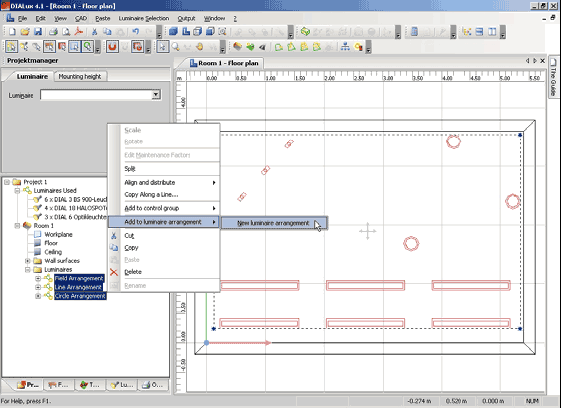
With DIALux you can position the luminaires individually, in a circle, in a line or in a field. You can then form them into groups to deal with them geometrically and/or as an electrical unit. Just add your desired luminaire arrangement to a new luminaire arrangement via context menu of the selected luminaire arrangement.
Fig. 158 Context menu of the unrestricted luminaire arrangement
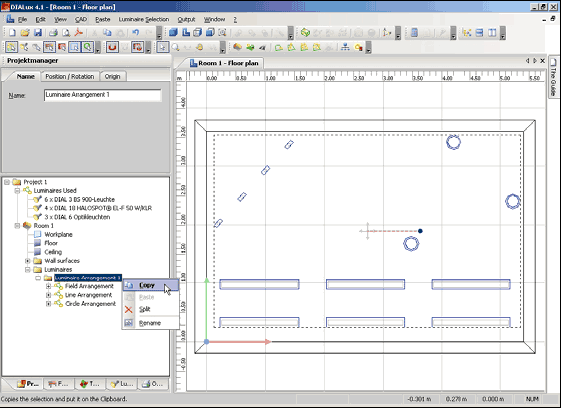
You can modify these further by changing the name, position / rotate or modify the origin.
Fig. 159 Modify the new luminaire arrangement
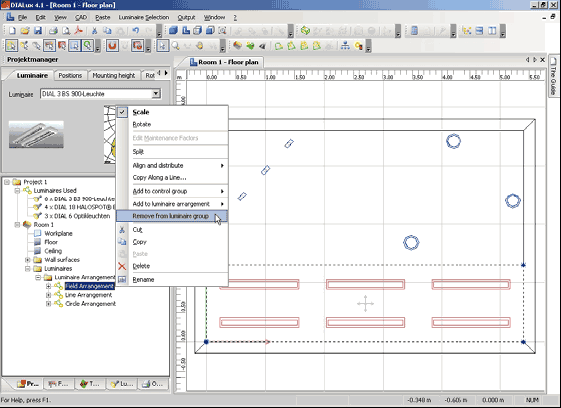
You have the ability to copy and paste the whole luminaire arrangement in the context menu. If you want to take out individual luminaires of the new luminaire group, first of all you have to split the unrestricted luminaire arrangement. Then you can select the luminaire which should be removed from luminaire group and open the context menu. Now you can access the function Remove from luminaire group.